The 'Wrap Up' Signal: How to End Sessions on Time, Every Time
Nobody likes cutting off a speaker mid-sentence. Here is how StageClock's visual signals help you end sessions gracefully.
Table of Contents
The most stressful part of an event is when a speaker is running late. You don't want to be the "bad guy" who walks onto the stage to stop them, but you also have a schedule to keep.
StageClock gives you a "Digital Nudge" that handles the hard work for you.
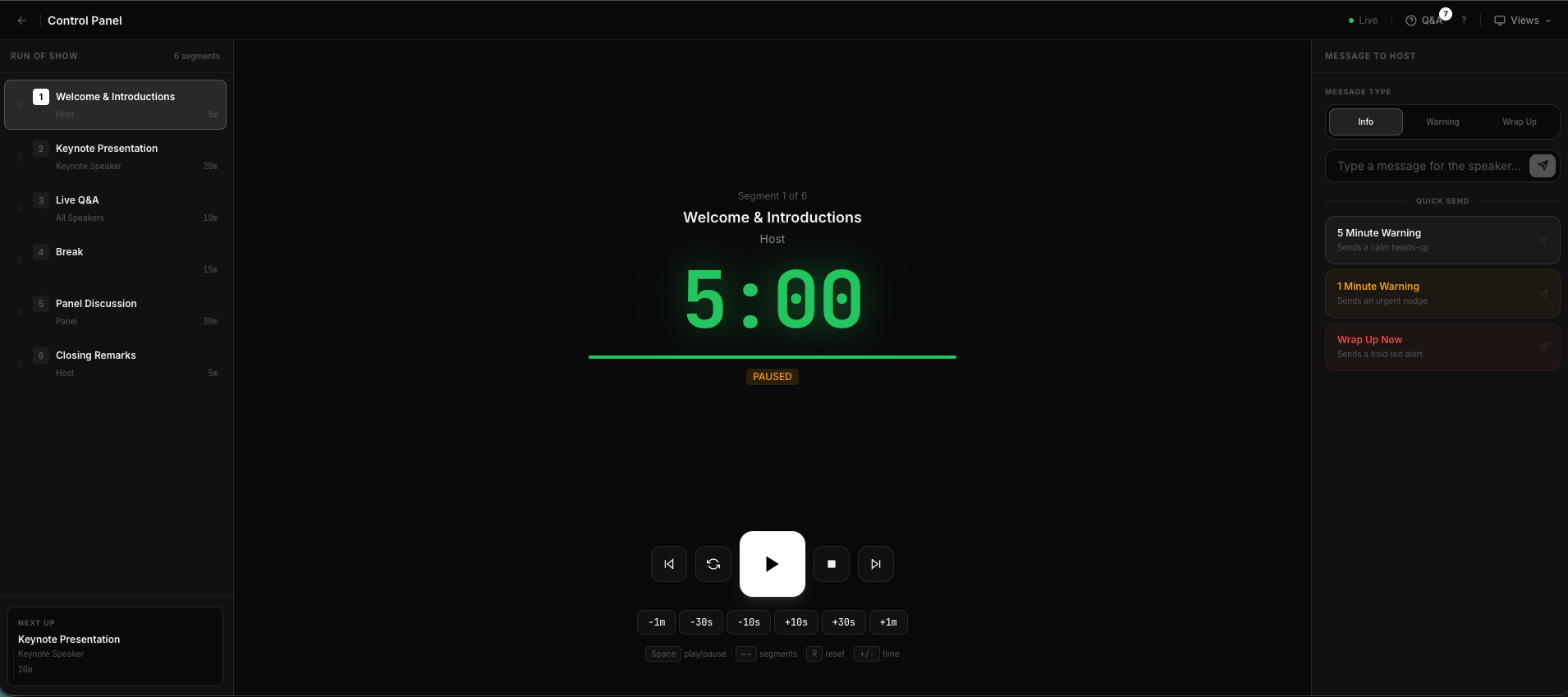
Use our 'Quick Send' buttons to nudge your speaker without making a scene.
The Three Levels of Nudging
In the Control Panel, we have built-in signals that you can trigger with one click:
- The Gentle Color Shift: As the clock hits 2 minutes, it turns yellow. Most speakers see this and naturally start their conclusion.
- The Private Message: If they're still going, you can send a private "Wrap Up" message that only appears on their monitor.
- The Red Alert: When time is up, the clock turns red and starts counting up. This is a clear, professional signal that they are over time.
Why This Works
It’s less confrontational. When a speaker sees a red clock, they feel the "accountability" to the audience and the other speakers. They don't feel like you are attacking them; they feel like the clock is telling them it's time.
Pro-Tip for Producers
Always tell your speakers about the color changes before they go on stage.
"Hey, just so you know, the timer will turn yellow when you have 2 minutes left, and red when you're done."
This simple heads-up makes the signal 10x more effective and keeps your show running like clockwork.
Master your show's schedule. Explore StageClock's professional control features.